NotebookPlus features
What NotebookPlus adds to NotebookLM
One-click webpage import, bulk import, source folders, notebook tags, and a prompt library — a productivity layer that stays inside Google NotebookLM and Gemini Notebook™. Start free. No credit card required.
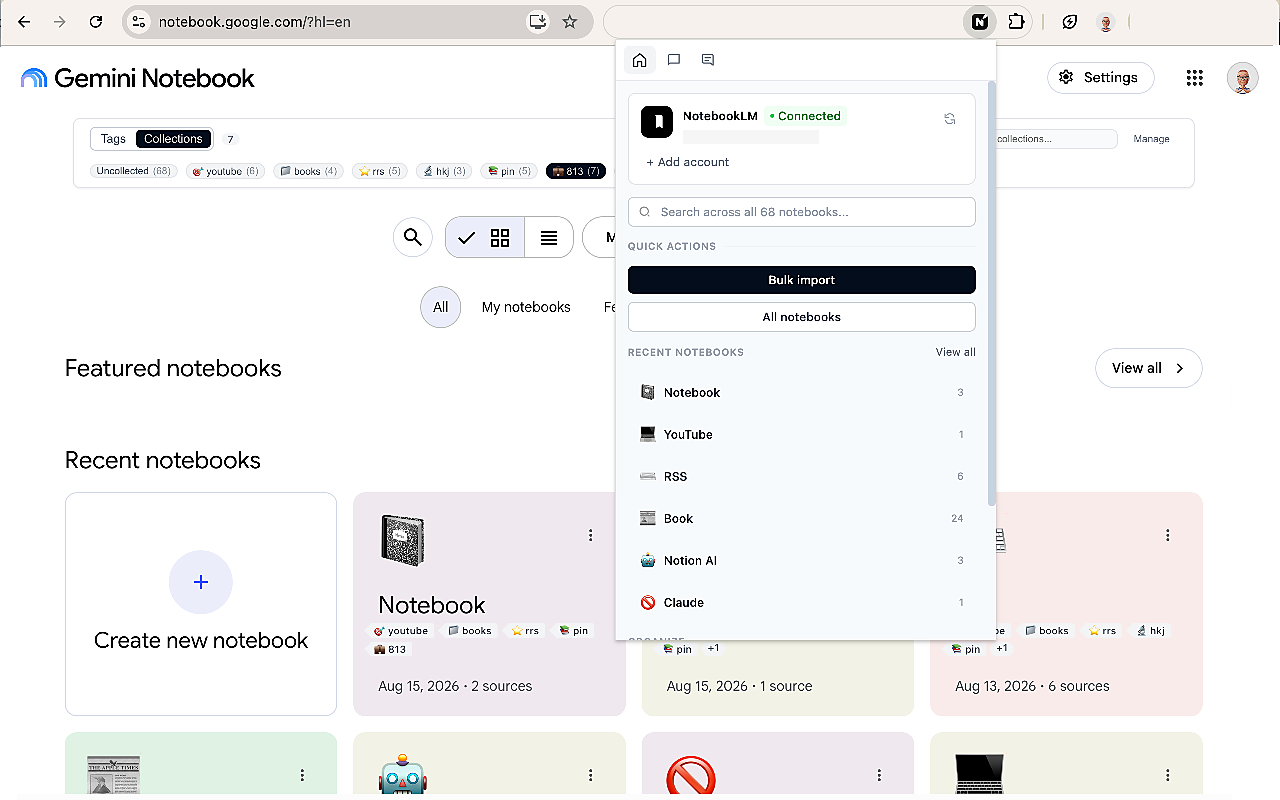
What's included
Core import plus organization tools for notebooks, sources, and reusable prompts.
One-click webpage import
Save the page you are on into NotebookLM as a source — without copy-paste, downloads, or extra tabs.
Bulk import
Paste a list of supported URLs and add them to a notebook instead of adding each source by hand.
Source folders
Group PDFs, links, and videos inside a notebook by topic or project — labels stay native, folders add structure.
Notebook tags
Color-code notebooks and filter the library. Source labels organize inside one notebook; tags organize the whole list.
Prompt Manager
Save reusable prompts, organize them, and insert them with a shortcut. Custom instructions stay on one notebook.
Collections
Group related notebooks into broader sets such as work, research, or school — stored with your Google account.
Need to add a whole list of URLs? NotebookLM Bulk Import
Organize sources and notebooks with Folders, Tags, and Prompt Manager.
NotebookLM Guides & Tools
Explore NotebookLM Tools & Guides
NotebookLM Bulk Import
Import multiple sources faster.
NotebookLM Folders
Organize sources inside your notebooks.
NotebookLM Tags
Categorize and filter your notebooks.
NotebookLM Prompt Manager
Save and reuse your favorite prompts.
How to Organize NotebookLM
Learn how to organize NotebookLM with folders, tags, collections, and prompts.
NotebookLM is the workspace. NotebookPlus adds the tools around it.
Import, organize notebooks and sources, and reuse prompts — without replacing Gemini Notebook™.
NotebookLM without NotebookPlus
Pages added one by one
You can add a source, but a stack of tabs still means repeating the same steps.
A flat source list
NotebookLM can label sources by topic. A long notebook still reads as one list.
Source labels, not notebook tags
Labels help inside one notebook. They do not filter your whole library.
Retype the same instructions
Custom instructions stay with one notebook. Repeated tasks get written again.
A long notebook list
Related notebooks sit in one scroll unless you group them yourself.
With NotebookPlus
IncludedOne-click and bulk import
Save the page you are on, or import a list of supported sources into a notebook.
Source folders
Group PDFs, links, and videos inside a notebook by topic or project.
Notebook tags
Color-code notebooks and filter the library when you have many projects.
Prompt Manager
Save reusable prompts, organize them, and insert them with a shortcut.
Collections
Group related notebooks into broader sets such as work, research, or school.
Import any webpage into Gemini Notebook™. Start free, or Go Pro today.
3-day money-back guarantee on every paid plan.
NotebookLM™, Gemini™, and Gemini Notebook™ are trademarks of Google LLC. NotebookPlus is not affiliated with, or endorsed by, Google.